Scheduling Strategy
Connecteam vs Sling (2026): Key Differences In Scheduling Tools

If you’re comparing Connecteam vs Sling, you’re probably trying to fix a scheduling problem. Maybe it’s Sunday night schedule building, overtime creeping up, or staff constantly requesting shift swaps.
Both Connecteam and Sling offer employee scheduling, messaging, and time tracking tools. On the surface, they can look similar. But once you start using them, the differences become clearer in how schedules are built, how teams communicate about shifts, and how attendance is tracked.
For teams evaluating Sling competitors or comparing Connecteam vs Sling directly, those day-to-day workflow differences usually matter more than long feature lists.
Connecteam vs Sling: At-a-glance comparison (2026)
Choosing between Connecteam and Sling often comes down to how much workforce management functionality you want alongside scheduling.
| Category | Connecteam | Sling | When I Work |
| Primary focus | All-in-one workforce management | Simple employee scheduling, and team communication | Scheduling-first team management with scheduling, attendance tracking, and communication |
| Pricing | Hub-based pricing with flat tiers for the first 30 users | Free scheduling plan (up to 30 users) with paid workforce tools | Per-user pricing with a single-location plan ($2.50/per user) and a multi-location plan ($5/per user) |
| Free plan | Yes (up to 10 users) | Yes (up to 30 users) | 14-day full-access trial that unlocks all features |
| Scheduling | Drag-and-drop scheduling with templates and automation tools | Drag-and-drop scheduling with templates and auto-scheduling | One-click auto-scheduling that builds schedules based on availability, roles, certifications, and overtime rules |
| Time tracking | GPS tracking and geofencing | Mobile time tracking on paid plans | GPS clock-in and optional photo identity verification |
| Messaging | Built-in chat and announcements | Team messaging and updates | WorkChat built into scheduling, with alerts, announcements, and shift notifications |
| Payroll integration | Payroll integrations via supported partners | Payroll reports and integrations | Payroll integrations plus a preferred partnership with Rippling for HR and payroll |
At first glance, the platforms all seem similar. The real differences show up in how teams build schedules, communicate with staff, and track attendance.
Pricing comparison: Connecteam vs Sling
When buyers compare Connecteam pricing vs Sling pricing, the numbers initially look simple, but they’re not. The difference comes down to hub stacking versus per-user expansion.
Connecteam pricing model
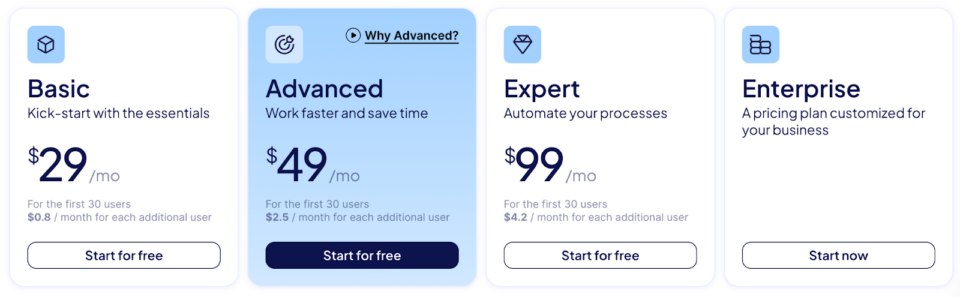
Image source: Connecteam Pricing
Connecteam uses a hub-based pricing structure. Instead of paying for a single platform plan, companies subscribe to separate product areas called hubs:
- Operations Hub includes scheduling, time tracking, forms, and task management
- Communications Hub includes team chat, announcements, surveys, and internal updates
- HR & Skills Hub includes training, documents, recognition, and employee records
Each hub has its own pricing tiers.
Connecteam also offers a free Small Business Plan for up to 10 users, including access to all hubs and features. Once teams move beyond that threshold, pricing is typically structured around the first 30 users per hub, with additional per-user costs after that.
For example, within the Operations Hub:
- Basic: $29 per month for the first 30 users, then $0.80 per additional user
- Advanced: $49 per month for the first 30 users, then $2.50 per additional user
- Expert: $99 per month for the first 30 users, then $4.20 per additional user
Similar pricing tiers exist for the Communications Hub and the HR & Skills Hub, each with its own monthly subscription.
In practice, this means companies using multiple parts of the platform, such as scheduling, messaging, and training, will need to subscribe to more than one hub.
For organizations looking for a broad workforce management system, this structure allows different operational tools to be added over time. For teams mainly focused on scheduling and attendance, it also means evaluating which hubs are necessary for daily scheduling tasks.
Sling pricing model
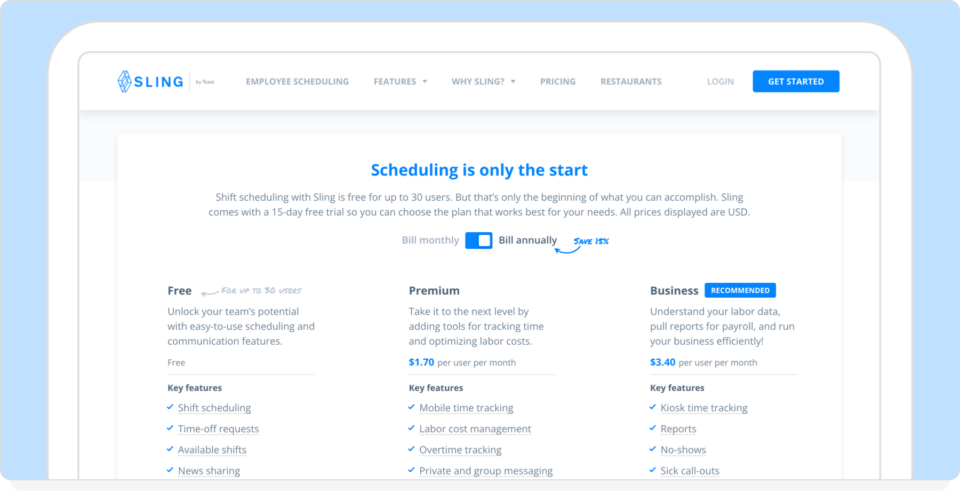
Image source: Getsling Pricing
Sling offers one of the more generous free plans in the scheduling software market. The free plan supports up to 30 users and includes core scheduling and communication features such as:
- Shift scheduling
- Time-off requests
- Available shift posting
- Team messaging
- News and announcements
- Long-term schedule planning
For teams that only need a simple scheduling tool, this free tier can cover the basics.
Beyond the free plan, Sling moves into per-user pricing tiers that add workforce management tools.
Premium: $1.70 per user per month
This tier adds features such as:
- Mobile time tracking
- Labor cost management
- Overtime tracking
- Calendar synchronization
- Expanded messaging features
Business: $3.40 per user per month
This tier adds more operational oversight, including:
Kiosk time tracking
Reporting tools
No-show tracking
Sick call-out tracking
PTO management
One important distinction is that time tracking and labor management tools are not included in the free plan. Teams that want to track hours worked or monitor overtime typically need to move to the Premium tier.
Sling’s pricing structure is straightforward. Scheduling is free for smaller teams, and extra workforce management tools are unlocked through per-user plans.
How When I Work compares
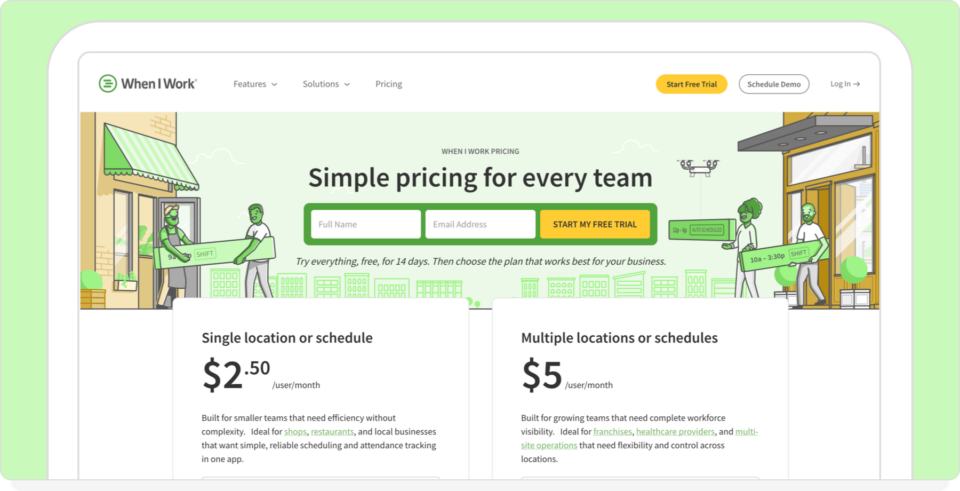
When I Work uses straightforward per-user pricing, starting at $2.50 per user per month for a single location or schedule, or $5 per user per month for businesses managing multiple locations or schedules.
Scheduling, team messaging, and time tracking are included in the core product. Managers build the schedule, notify staff, track hours, and fill open shifts in the same place, without turning on separate hubs or paying for additional modules just to cover the basics.
That difference becomes obvious in everyday situations.
If someone calls out before a shift, the manager can post the opening, alert available staff, and confirm coverage quickly. Messages go directly to the employees connected to that schedule. Availability rules, certifications, and overtime warnings are already part of the system.
By comparison, Connecteam organizes tools across hubs such as Operations, Communications, and HR & Skills, each with its own pricing tier. Sling offers free scheduling for up to 30 users, but time tracking, overtime monitoring, and reporting are available only in paid tiers.
When I Work keeps the focus tighter. Build the schedule, alert the team, track attendance, and prepare hours for payroll.
For managers dealing with shift changes, call-outs, and weekly schedule updates, keeping those core functions together often means fewer steps and faster decisions.
Scheduling automation: Which platform actually saves time?
Both Connecteam and Sling market automation heavily in 2026. The real difference is how those tools behave when managers are building schedules, adjusting shifts, and responding to last-minute changes.
Connecteam scheduling
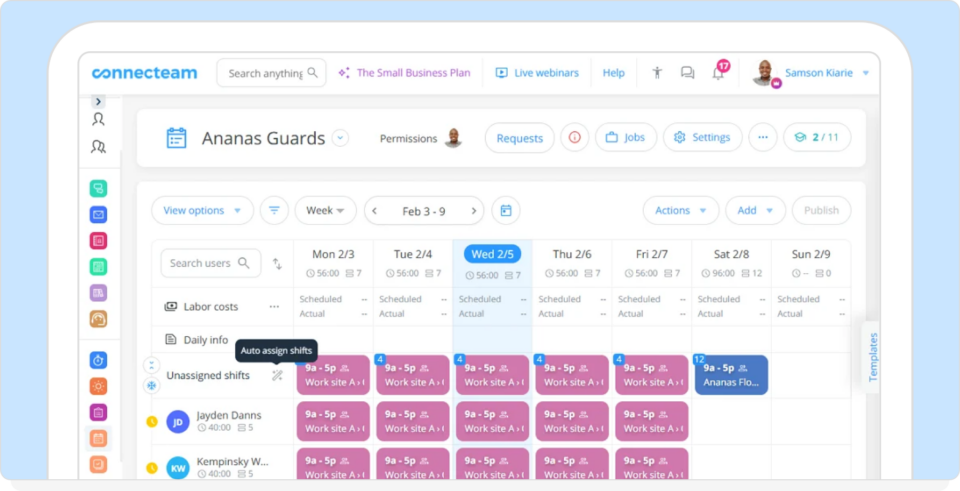
Image source: Connecteam Scheduling
Connecteam offers advanced scheduling tools supported by configurable rules and policies. Managers can:
- Set qualification requirements
- Apply overtime limits
- Enforce rest periods between shifts
- Generate schedules using templates or automation tools
For businesses that need strict rule enforcement or compliance controls, these settings can be useful. However, scheduling sits within a broader system that also includes forms, surveys, training tools, and internal communication features. While that expands what the platform can do, it can also mean more setup and more configuration before schedules are fully automated.
Sling scheduling
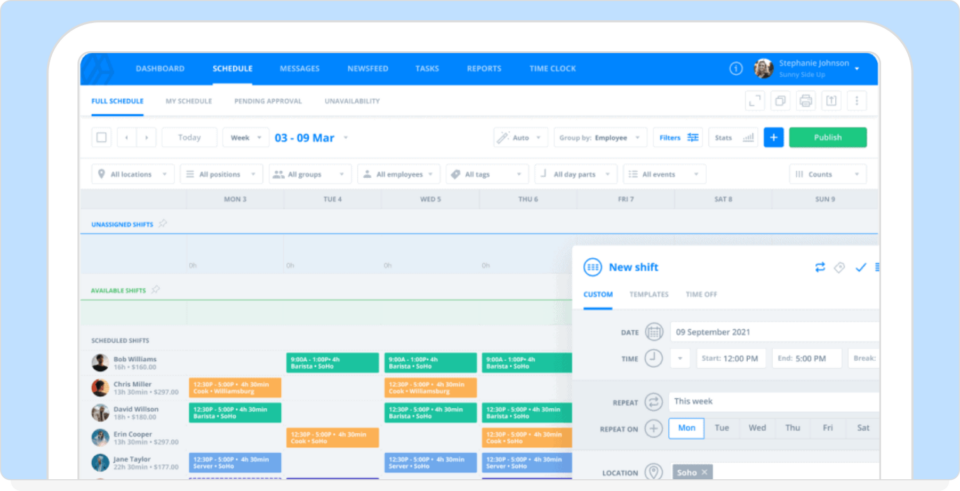
Image source: Getsling Employee Scheduling
Sling emphasizes scheduling tied to labor cost visibility. Managers can:
- Track labor costs against targets
- Prevent clopening shifts
- Monitor availability and time-off requests
- Allow employees to claim open shifts
Templates and auto-scheduling tools are available, helping managers build schedules faster once staffing patterns are established.
However, some basic management features, such as time tracking and reporting, appear only in paid tiers, meaning some teams move beyond the free plan once they need deeper oversight of hours worked.
When I Work scheduling
When I Work focuses on how quickly managers can build and adjust schedules during a normal workweek. Core features include:
- One-click auto-scheduling that considers availability and roles
- Certification-aware assignments
- Overtime alerts are sent before schedules are published
- One-click shift fills when someone calls out
- Messaging tied directly to the schedule
Because scheduling, messaging, and attendance tracking sit together, managers can update the schedule, notify staff, and confirm coverage without switching between tools.
In practical terms, that means fewer steps when filling open shifts, confirming availability, or correcting a schedule before payroll closes.
Compliance and labor safeguards
Labor regulations around scheduling, overtime, and rest periods have become stricter in many regions. As a result, many scheduling platforms now include safeguards that help managers avoid accidental violations when building schedules.
Connecteam compliance tools
Connecteam includes a wide range of compliance tools designed to enforce scheduling rules and document workforce activity. Key safeguards include:
- Fair workweek compliance tools
- Mandatory break enforcement
- Overtime threshold alerts
- Document storage for employee records
For organizations operating under predictive scheduling laws, Connecteam also offers a Good Faith Estimate feature that helps employers provide new hires with an estimate of expected working hours.
These tools are designed to help managers enforce scheduling policies automatically rather than relying on manual oversight.
Sling compliance controls
Sling focuses on safeguards built directly into the scheduling process. Key features include:
- Clopening prevention to maintain minimum rest periods between shifts
- Break attestation requires employees to confirm their breaks before clocking out
- Rest-period alerts when shifts are scheduled too closely together
These controls help managers avoid common scheduling mistakes that can lead to compliance issues or employee disputes.
When I Work compliance features
When I Work approaches compliance through scheduling rules and clear audit trails. The platform includes:
- Maximum hours enforcement rules
- Overtime alerts are visible before schedules are published
- Scheduling rules for minimum rest periods, shift conflicts, and availability enforcement
- Time-stamped records of schedule changes and attendance activity
Because every schedule edit and time entry is logged, managers have a clear record of how shifts were assigned and worked.
In practice, these safeguards help reduce overtime surprises and provide documentation if questions arise around hours worked or scheduling decisions.
Sling scheduling reviews: What users highlight
If you’re reading Sling scheduling reviews, a few consistent themes appear across platforms like G2 and Capterra. Positive feedback often highlights:
- Clean, easy-to-understand scheduling interface
- Quick shift swaps and open shift posting
- Labor cost visibility tied to sales data
- Strong value from the free plan for smaller teams
At the same time, some reviews point out limitations that emerge once teams start using the system daily. Common concerns include:
- Notification delays reported on some Android devices
- Key features, such as time tracking and reporting, only appearing in paid tiers
- Limited flexibility when managing more complex scheduling rules
Overall, Sling is frequently praised for making basic scheduling straightforward. However, some reviews note that the platform’s free tier focuses mainly on schedule visibility, while deeper workforce management tools appear in the Premium and Business plans.
Connecteam scheduling reviews: What users highlight
In Connecteam scheduling reviews, user feedback often focuses on the platform’s depth and flexibility. Positive reviews frequently mention:
- Advanced scheduling tools with templates and automation
- Strong rule settings for compliance and overtime control
- GPS tracking and geofencing for attendance verification
- Extensive customization across scheduling, forms, and internal tools
At the same time, some reviews highlight trade-offs that appear during day-to-day use. Common concerns include:
- A steeper learning curve during initial setup
- Features spread across multiple hubs such as Operations, Communications, and HR & Skills
- Pricing complexity when several hubs are activated together
Connecteam is often praised for the extensive functionality it offers in a single platform. Businesses that want scheduling alongside training, forms, internal communication, and HR tools may find that range useful.
However, managers focused on building schedules, tracking hours, and coordinating staff sometimes note that managing multiple hubs can add extra steps to routine scheduling tasks.
Operational reliability in day-to-day use
Workforce software only works if employees actually use it. User reviews across platforms suggest:
- Connecteam offers deep functionality but can require longer onboarding due to its breadth. Some reviews also mention occasional bugs or slowdowns, as well as noticeable cost increases when additional hubs are activated.
- Sling receives praise for its iOS interface, but 2026 reviews report that it can be temperamental on Android, with issues such as random logouts and delayed notifications.
- When I Work emphasizes speed of execution and adoption in shift-based environments, and is reviewed positively for its color-coded interface and quick implementation.
Of course, with any workforce management tool, the real test is how quickly a manager can:
- Send a shift update
- Confirm acknowledgment
- Prevent overtime exposure
- Resolve a call-out
Those small moments determine whether software removes friction from the workday or simply moves it somewhere else.
Final verdict: Connecteam vs Sling
Choosing between Connecteam vs Sling comes down to how your team actually manages scheduling, communication, and labor tracking day to day.
Choose Connecteam if:
You want a broad workforce platform that includes scheduling, compliance tools, forms, document storage, and GPS tracking in a single system.
Connecteam can be a strong fit for teams that need detailed rule controls, structured compliance safeguards, and a wider set of internal management tools. Organizations that plan to use multiple hubs may benefit from the depth and flexibility the platform provides.
Choose Sling if:
You want a simple scheduling tool with a generous free tier and built-in labor cost visibility.
Sling’s free plan supports up to 30 users and covers the basics of scheduling, shift swaps, and team communication. Additional features such as time tracking, reporting, and labor management are available in paid tiers, so teams need to evaluate whether those upgrades align with their operational needs.
Choose When I Work if:
Scheduling speed, team coordination, and attendance tracking are the center of your operation.
When I Work keeps scheduling, messaging, and time tracking together in the same system. Managers can build schedules, notify staff, fill open shifts, and track hours without activating additional modules or juggling separate tools.
For teams that deal with call-outs, shift swaps, and weekly schedule changes, keeping those core functions together makes day-to-day scheduling easier to manage.
The fastest way to decide which software is best for your business isn’t reading another feature list. Software debates are theoretical, but scheduling challenges are not. Start your 14-day trial of When I Work and pressure-test it against your real workflow.
Frequently asked questions: Connecteam vs Sling
Choosing workforce software often comes down to how a platform handles scheduling, communication, and time tracking during everyday operations. Below are some of the most common questions managers ask when comparing Connecteam and Sling.
Is Connecteam better than Sling?
Connecteam and Sling serve slightly different purposes. Connecteam operates as a broader workforce management platform that includes scheduling, compliance tools, document storage, and internal communication features organized across separate hubs.
Sling focuses mostly on employee scheduling and labor visibility, with additional workforce management tools available in higher tiers.
The better option depends on whether your team prefers a broader set of management tools or a simpler scheduling-focused system.
What is the main difference between Connecteam and Sling?
The main difference is how each platform organizes its tools. Connecteam divides functionality across hubs such as Operations, Communications, and HR & Skills. Businesses can activate the hubs they need depending on the tools they plan to use and the price they’re willing to pay.
Sling centers the platform around scheduling, with time tracking, labor monitoring, and reporting appearing in paid tiers.
Connecteam pricing is based on hub subscriptions, while Sling moves from a free plan to per-user pricing for additional capabilities.
Is Sling free?
Yes. Sling offers a free plan for up to 30 users that includes core scheduling tools such as:
- Shift scheduling
- Time-off requests
- Available shift posting
- Team messaging
However, features such as time tracking, reporting, and advanced labor tools are only available in paid tiers.
How does Connecteam pricing compare to Sling pricing?
Connecteam and Sling structure their pricing differently.
Connecteam offers a free Small Business plan for up to 10 users, which includes access to all three hubs: Operations, Communications, and HR & Skills. Beyond that, paid plans are priced per hub, with tiers starting at $29 per month for up to 30 users in a hub such as Operations. If a team activates multiple hubs, each hub has its own subscription tier.
Sling offers a free plan for up to 30 users that includes core scheduling and communication tools. Paid plans start at $1.70 per user per month, adding features such as time tracking, labor cost management, and reporting.
Because the two platforms package features differently, many teams compare which tools are included in the base product versus which require additional tiers or modules.
What are the best Sling competitors in 2026?
Several workforce scheduling platforms compete with Sling, including Connecteam, When I Work, Homebase, and ZoomShift.
Connecteam offers a broader workforce management platform with scheduling, time tracking, forms, training, compliance tools, and internal communication split across separate hubs. The free Small Business plan covers up to 10 users across all hubs, but once a team moves beyond that limit, paid pricing starts at $29 per hub for up to 30 users, which means costs can climb quickly if scheduling, messaging, and HR tools all need to be active at the same time.
When I Work keeps scheduling, time tracking, and team messaging together in one system. Pricing starts at $2.50 per user per month for a single location or schedule, or $5 per user per month for multiple locations or schedules. That makes it easier for managers to build schedules, send alerts, fill open shifts, and track attendance without adding separate hubs or upgrading just to cover the basics.
Homebase combines scheduling with labor cost visibility, hiring tools, and optional payroll, and its free plan can work well for one location and up to 10 employees. But team messaging and stronger scheduling tools sit behind paid tiers starting at $24 per location per month, and each additional location needs its own subscription. Payroll is also an add-on that costs $39/month plus $6/month per employee paid, so the platform becomes less attractive once a business needs coordination across more than one site.
ZoomShift offers a free plan for up to 20 users with basic scheduling and communication features. Paid plans start at $2 per user per month, with time tracking, availability, and shift swaps added on the Starter plan. However, auto-scheduling, overtime warnings, geofencing, early clock-in controls, and stronger permissions are available only on the $4 per user per month Premium tier. That makes ZoomShift a decent lightweight scheduler, but not the strongest option for teams that need more control built into day-to-day scheduling.
The best Sling competitor depends on what matters most to your team. If you want a broad workforce suite, Connecteam covers a lot of ground. If you want a low-cost entry tool, Homebase and ZoomShift both have usable free plans. But if your priority is getting scheduling, messaging, and attendance working together without extra hubs, location-based pricing, or feature gating, When I Work makes the strongest case.
What are the most common complaints in Sling scheduling reviews?
Sling reviews frequently mention the platform’s simplicity and the value of its free scheduling tier. Some users report limitations once they need more advanced workforce management features, since tools like time tracking are available only in paid plans. There are also occasional reports of delayed notifications or stability issues on certain Android devices.
What are the common themes in Connecteam scheduling reviews?
Connecteam reviews often highlight its range of tools, including rule-based scheduling, compliance safeguards, and GPS-based time tracking. At the same time, some users note that onboarding can take longer because many tools are spread across separate hubs. Pricing will also increase when additional hubs are activated. For teams that need extensive customization and compliance controls, the flexibility can be an advantage.
Which platform handles multi-location scheduling most easily?
Connecteam, Sling, and When I Work all support scheduling across multiple teams. Connecteam organizes tools across hubs that can include scheduling, communication, and HR features. Sling centers on scheduling and labor visibility, with time tracking and reporting available in paid tiers.
When I Work keeps employee scheduling, team messaging, time tracking, and payroll integrations within the same system, which can simplify coordinating staff across multiple locations.
Ready to stop paying for scheduling friction?
You’ve seen how Connecteam scales. You’ve seen where Sling fits. Now test the platform designed around fast scheduling.
- Import your team
- Build next week’s schedule
- Handle a call-out or shift swap
If it takes longer than it should, you’ll know.
Start your 14-day free trial of When I Work and pressure-test your scheduling process today.
Disclaimer: This comparison is based on publicly available information and product documentation at the time of writing. Features, pricing, and functionality may change over time. While we aim to present accurate and up-to-date information, we recommend reviewing each provider’s official website for the most current details.