Scheduling Strategy
Comparing Homebase vs When I Work in 2026

If you’re currently searching for the Homebase login or the joinhomebase app, you likely fall into one of two camps: you’re a brand-new business looking for your first digital calendar, or you’re a growing team starting to feel the limits of a basic scheduling tier.
Looking for the Homebase login page? You can access it directly through joinhomebase.com. If you’re instead comparing platforms before committing to a long-term workforce strategy, this guide walks through the operational differences.
For a single-location team or a multi-site operation, choosing between Homebase and When I Work comes down to how you want to manage scheduling, time tracking, and communication.
Homebase is often positioned as a straightforward scheduling tool for hourly teams. When I Work is built as an automated workforce platform designed to simplify scheduling, time tracking, and team communication in one place. In this Homebase vs When I Work comparison, the decision depends on whether you’re looking for a basic scheduling app or a more structured system that helps reduce manual coordination across your workforce.
The Homebase vs When I Work decision framework
Here’s an operational breakdown of where each platform provides the most value:
Choose Homebase if
You have a single location, a stable team of under 10 people, and your main goal is to move off paper using built-in hiring and HR tools without a monthly subscription.
Choose When I Work if
You want to optimize your labor costs, reduce the stress of managing employee availability and callouts, speed up scheduling, simplify time tracking, and integrate payroll in one system. When I Work helps you automate shift assignments, improve accountability, and ensure visibility across your team without relying on spreadsheets or manual coordination.
When Homebase makes more sense
Before looking into the deep features, it’s important to acknowledge where Homebase excels. It remains a strong choice for small, single-location teams that value having hiring, onboarding, and basic scheduling in one place. For businesses with fewer than 10 employees and stable shift patterns, Homebase’s simplicity can be a benefit rather than a limitation. If your main goal is to digitize a simple shop schedule, it’s a highly capable tool.
Comparison overview: Strategic differences at a glance
While both platforms aim to simplify workforce management, they solve the problem from opposite ends of the spectrum. Homebase focuses on providing a wide net of HR and hiring tools for small, single-site businesses, whereas When I Work specializes in deep, rule-based automation that makes scheduling easier for managers.
| Homebase | When I Work | |
| Ideal for | Single-location startups | Scaling businesses with multiple locations |
| Scheduling | Manual drag-and-drop | Rule-based auto-scheduling |
| Time tracking | GPS geofencing | GPS and photo identity verification |
| Cost | Per location | Per user |
| Messaging | Gated on basic tiers | WorkChat included in every plan |
What is Homebase and where does it hit a ceiling?
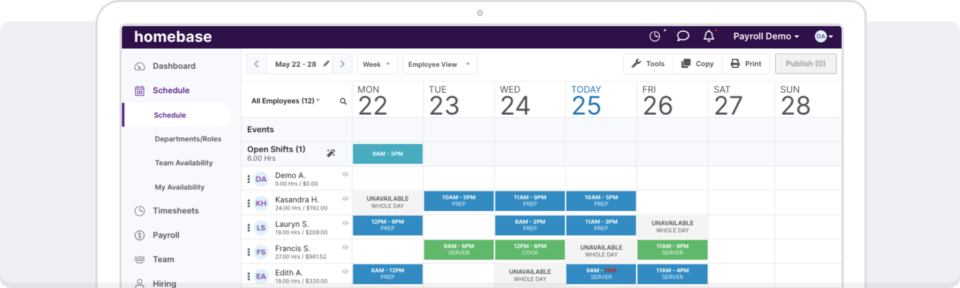
Image source
Homebase is an all-in-one team management app tailored for Main Street businesses. Think single-location cafes, boutiques, and small retail shops. It’s widely known for the Homebase basic plan, which offers free scheduling and time tracking for teams of up to 10 employees at a single site.
While it excels at simplifying hiring and onboarding for tiny teams, growing organizations often find that Homebase is built for simplicity, not complexity. As your team grows or you work in high-accountability sectors like healthcare or hospitality, the all-in-one approach can feel restrictive.
The Homebase profile:
The catch: Many features that small businesses rely on daily, such as employee availability management, labor cost visibility, and shift swaps, are limited to higher-tier plans. As needs evolve, per-location pricing can increase overall costs.
G2 rating: 4.4 / 5.0 (As of March 2026)
Best for: Micro-businesses with under 10 employees and one physical address.
What is When I Work and why small and growing businesses choose it?
When I Work is a workforce management platform built for owner-operators and scheduling managers who are balancing shifts, payroll, call-outs, and daily operations all at once. It is designed to take scheduling complexity and make it simple.
Instead of acting as a digital calendar, When I Work helps automate scheduling, improve labor visibility, and reduce manual coordination. Features like auto-scheduling, labor forecasting, shift swaps, availability tracking, and time tracking are included so managers can spend less time fixing schedules and more time running the business.
From photo verification at clock-in to payroll connections with providers like Rippling and Gusto, the platform is built to save time, reduce labor waste, and help teams manage coverage without constant oversight.
The When I Work profile:
- G2 rating: 4.4 / 5.0
- Best for: Owners and managers who want to reduce labor costs, stay ahead of callouts, and automate scheduling without upgrading to unlock essential features.
- The advantage: Essential workforce tools such as availability management, labor forecasting, auto-scheduling, and shift swap controls are available across plans. Instead of paying extra to access basic functionality, you choose the plan based on your location needs, not locked features.
Homebase vs When I Work: 2026 core feature breakdown
When comparing Homebase vs When I Work, the most significant differences lie in how they handle shift planning and operational accountability. While both offer a solid employee scheduling app and time tracking, they’re built for different organizational goals.
Homebase: The all-in-one starter kit for micro-teams
Homebase focuses on broad utility, integrating hiring and HR directly into the app to keep small businesses moving without needing a large tech stack.
- Rule-based scheduling relies on drag-and-drop templates. It’s functional but requires manual oversight to prevent certification or availability conflicts.
- Hiring and onboarding includes built-in applicant tracking and digital onboarding, making it a strong choice for businesses with frequent high-turnover hiring needs.
- Time tracking focuses on offline tracking and tablet-based kiosks, ideal for job sites with spotty internet.
- Pricing: The Homebase basic plan is free for up to 10 users, but it restricts access to messaging and advanced labor reports.
When I Work: The workforce platform without gated features
When I Work includes scheduling, time tracking, availability management, labor forecasting, and shift swap controls in every plan, so business owners and managers can automate operations without upgrading to unlock essential tools. When coverage needs change due to business demands or employee availability, your workload doesn’t have to increase. And when your business grows, the tools you need are already included.
- Advanced auto-scheduling uses a rule-based engine to match the right employee to the right shift based on qualifications and costs. You can build a compliant, budget-optimized, automated schedule in a single click.
- Identity accountability goes beyond simple GPS geofencing with photo identity verification. Managers can require a photo at clock-in, dramatically reducing buddy punching and protecting your payroll.
- Easy communication includes team messaging a a standard feature on all plans, ensuring your team stays in sync without the hidden fees found in the Homebase scheduler.
- Scalability is easy. With a transparent per-user pricing model, you choose the plan based on your location needs rather than unlocking essential features. When your team expands to additional sites, you can upgrade to a plan that supports unlimited locations without changing how you manage schedules, staff, or coverage.
Employee scheduling comparison: Manual templates vs. one-click automation
Most managers switch from spreadsheets to a Homebase scheduler or a staffing and scheduling tool to save time. However, there’s a massive difference between a tool that gives you a digital calendar and a platform that actually builds the schedule for you.
The Homebase scheduler: Simple drag-and-drop for small teams
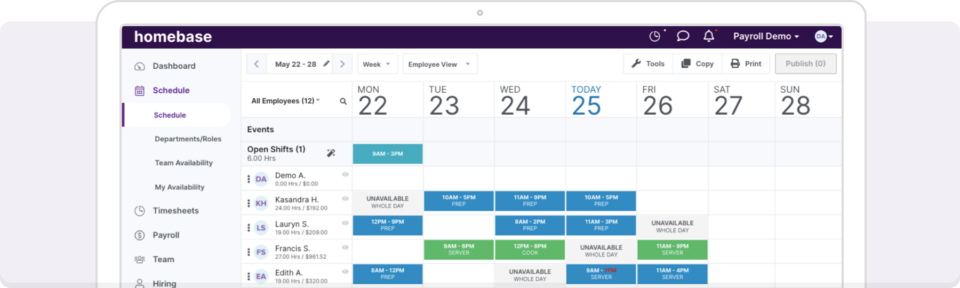
The Homebase employee scheduling app is built for simplicity. It allows managers to move off paper and into a digital interface where they can copy last week’s schedule or use basic templates.
- Limitations: On the Homebase basic plan, scheduling is fairly manual. You’re still the one checking who’s available, who’s qualified for a specific role, and who’s approaching overtime.
- Feature access: In Homebase, employee availability tracking and shift trading may require an upgraded plan. These are everyday scheduling tools that help managers reduce callouts, fill coverage gaps, and avoid manual coordination.
- The site silo: Homebase is built for single-site operations. If you have employees who work at different locations, you’ll likely find the interface restrictive and the per-location fees expensive.
When I Work: Rule-based auto-scheduling for scaling units

When I Work is designed to remove the heavy lifting from the manager’s desk. We focus on automated-scheduling, a feature that uses data you already have, like employee qualifications, preferred shifts, and availability, to build smarter schedules and save you time.
- One-click scheduling: Instead of manually assigning shifts, our automated-scheduling looks at employee availability, qualifications, and labor costs to fill your entire schedule in seconds.
- Cross-location visibility: Easily see where employees are scheduled across departments or job sites to avoid over-scheduling and save time.
- Proactive labor cost control: See projected labor costs and get overtime alerts before publishing so you can prevent unnecessary overtime and protect your margins.
- Shift swaps and availability management: Employees can request trades and update availability directly in the schedule, reducing back-and-forth messages and saving managers time while keeping final approval in their hands.
Homebase timesheets vs. When I Work: Accuracy and accountability
Ensuring that every minute is tracked reliably is the difference between a profitable shift and a budget leak. While both platforms offer a digital time clock, they differ in the level of oversight and payroll integration.
Homebase: Standard tracking for small brands
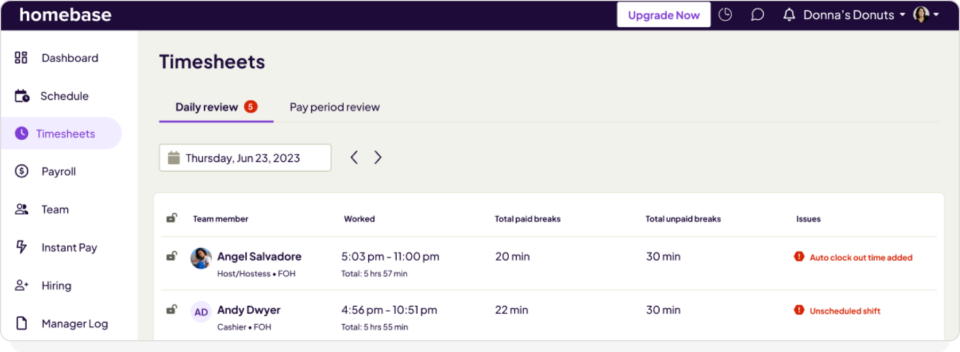
The Homebase timesheet system is built for businesses that just need to capture in-and-out data. It’s effective for general retail but can feel light on accountability for high-volume teams.
Payroll add-ons: Homebase offers its own payroll for an extra fee ($39 and $6/user), which can be convenient but also creates platform lock-in if you already have a payroll provider you trust..
GPS geofencing: Basic geofencing is available, but it often relies on the employee’s phone settings being perfectly configured, which can lead to disputes or missed clock-ins.
Gated reporting: Insights into labor costs and law compliance alerts are locked behind the Plus and All-in-One plans. If you’re on the Homebase basic plan, your visibility into real-time labor spend is limited.
When I Work: Accuracy and identity protection
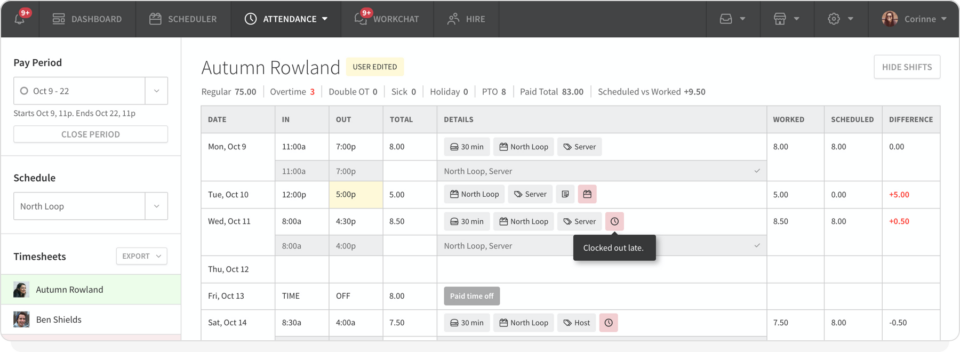
When I Work is built for managers who can’t be everywhere at once. We prioritize identity-verified attendance to ensure that your payroll is 100% accurate, 100% of the time.
Early clock-in prevention: We stop the unauthorized overtime before it starts. You can prevent employees from clocking in early, saving thousands in unapproved labor costs every year.
Photo identity verification: Beyond just GPS, employees can take a quick photo at clock-in to prevent buddy punching and ensure the right person is on the floor.
Flexible clock-in terminals: Turn any iPad, tablet, or smartphone into a secure time clock. Our system is designed for high stability, ensuring no records are lost during the morning rush.
Open ecosystem integration: We provide deep, direct exports and API syncs with ADP, Gusto, Rippling, Square, and more. You keep your workflow, we just make it faster and error-free.
Team communication comparison: Professional boundaries vs. gated access
Keeping a shift-based team in sync demands a system that respects employee privacy, ensures messages are actually read, and keeps work conversations separate from personal life.
Homebase
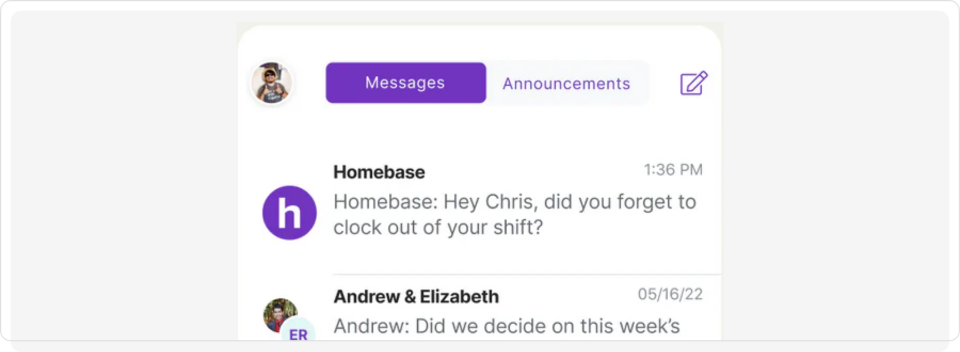
Homebase offers a built-in messaging system, but its greatest strength is also its biggest vulnerability for growing teams.
Notification fatigue: Without specialized controls, Homebase chats can quickly become a spam zone for employees, leading them to mute notifications and miss critical shift updates.
Gated by tier: While Homebase has a free version, advanced messaging features like read receipts and manager-controlled channels are often gated behind their paid plans.
Reliability concerns: Many 2026 user reviews point to buggy mobile notifications on Homebase, where employees may not receive urgent shift alerts or direct messages in real time.
When I Work WorkChat: Secure messaging for professional privacy
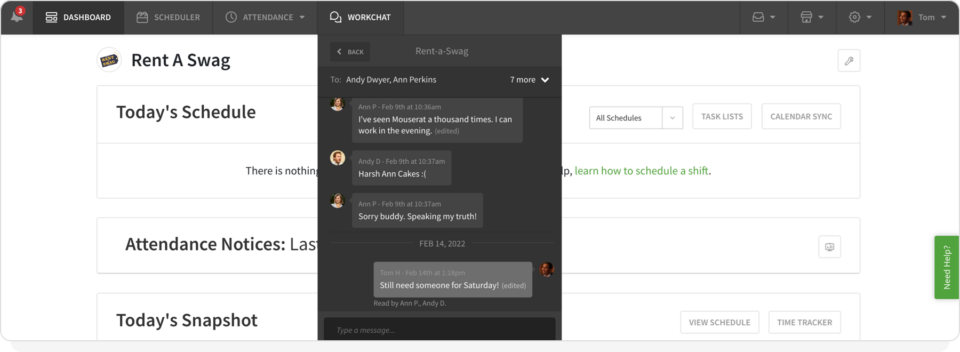
When I Work includes WorkChat in every plan, giving managers and employees a reliable way to communicate without relying on messy group texts or scattered app notifications.
- Zero personal data sharing: Unlike SMS or WhatsApp, WorkChat lets your team communicate without ever sharing their personal phone numbers.
- Guaranteed visibility with read receipts: Stop wondering if your team saw the announcement. When I Work provides real-time read receipts, so you know exactly who’s viewed the new schedule or the urgent shift note.
- SMS backup with TeamTxt: For employees without smartphones or with spotty data, our TeamTxt feature lets you send critical alerts via SMS directly from the app. You get the reach of a text message with the security of a professional platform.
- Automatic sync with the schedule: As soon as a new hire is added to your schedule, they’re automatically added to the relevant chats, meaning no manual entry and no missed invitations.
Pricing comparison: Homebase cost vs. When I Work ROI
When evaluating the Homebase cost, many managers focus on the free starting point. However, the real cost becomes clear as your team grows and you realize your basic needs aren’t included.
The Homebase Basic plan and the location-based growth ceiling
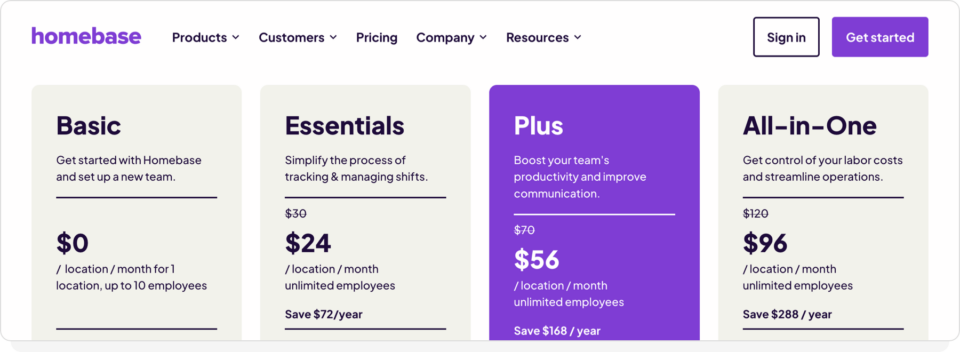
Homebase uses a per-location pricing model. While this appeals to single-site micro-businesses, it can create frustration when your needs expand and you want to optimize costs.
Payroll add-ons: Homebase payroll pricing is a flat $39/month plus $6 per employee. For a business that already has a trusted payroll provider, this built-in approach can lead to platform lock-in.
The Basic Plan trap: It’s free, but heavily restricted. You’ll find that essential tools, like messaging, mobile clock-ins, and labor cost tracking, are gated behind their paid tiers.
The per-site premium: Their paid plans range from $24 to $96 per month, per location. If you have three locations, you’re paying three separate fees, even if you’re sharing the same pool of employees across all of them.
Pricing information as of February 2026 from Homebase’s public pricing page.
When I Work: Scalable, transparent per-user pricing
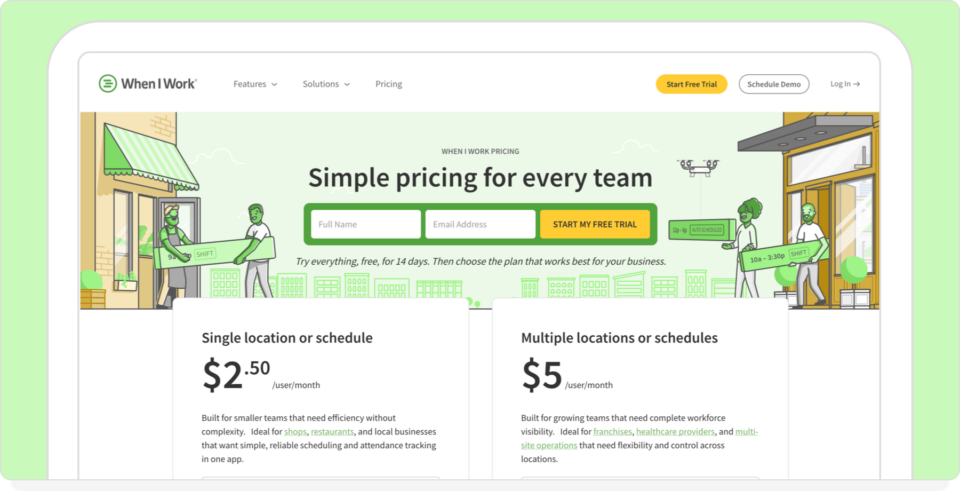
When I Work uses a pay-for-what-you-use model. We charge per user, which aligns your software costs directly with your actual labor force.
- Unlimited locations on the multi-location plan: On the multi-location plan, you can manage unlimited storefronts, departments, or job sites under a single account. Instead of paying per location, you choose the plan that fits your structure and keep scheduling, time tracking, and communication in one system as your footprint changes.
- Included in all plans: Employee availability, shift swaps, and WorkChat are available in every plan so your team can manage coverage, request changes, and stay accountable without adding to the manager’s workload.
Labor cost oversight: With scheduling and time tracking, you get a unified view of your labor budget across all sites. No site silos, no duplicate data, and no hidden fees.
Customization and integrations: Ecosystem freedom vs. platform lock-in
A workforce management tool should act as the connective tissue between how you sell (POS) and how you pay (Payroll). While both platforms offer integrations, their philosophies are fundamentally different.
Homebase: The built-in bias and platform silos
Homebase focuses on being an all-in-one HR suite. While they offer external integrations, their system is optimized to push you toward their internal tools.
- Hiring and job board integrations: Homebase offers built-in connections to job boards like Indeed and ZipRecruiter, which can be helpful if finding talent has been difficult in your industry. If you hire occasionally or already have a hiring process in place, these tools may be less central to your day-to-day scheduling needs.
- Payroll friction: While they integrate with some external providers, Homebase heavily incentivizes using their own native payroll. For many managers, that makes it harder to switch providers down the road.
When I Work: The best-of-breed hub
We believe you should use the tools that are best for your specific business. When I Work is designed to sit perfectly in the middle of your existing tech, providing the data needed for smarter staffing and scheduling.
- On-demand pay (Clair): We offer an integration that lets your employees access their earned wages instantly, at no cost to them and with no changes to your payroll process. It’s a massive retention tool that doesn’t require you to switch payroll.
- Payroll flexibility: If you use Rippling, ADP, Gusto, or QuickBooks, we provide direct API syncs. You keep the payroll provider you trust, and we make sure the data they receive is 100% accurate.
Customer success and support: Expert guidance vs. gated service tiers
When you’re dealing with a payroll deadline or a critical shift gap, you don’t have time to wait for a ticket response. While both platforms provide documentation, the speed and depth of support are major differentiators for professionals.
The Homebase support model: Gated access tiers
Homebase provides a standard Help Center and email support, but they treat direct access as a premium feature.
- Gated phone support: If you need to speak to a human over the phone, Homebase typically requires you to be on one of its higher-level paid plans. This can leave managers on the Homebase Basic or Essentials plan feeling stranded during technical issues.
- Generalist support: Because Homebase is an all-in-one platform for hiring, HR, and payroll, their support teams are often generalists who may not have deep expertise in complex, rule-based scheduling for specific industries.
When I Work: Award-winning expertise and dedicated support
At When I Work, we believe that professional managers deserve professional support, regardless of their plan.
- Lightning-fast response times: We pride ourselves on having some of the fastest Help Center chat and email response times in the industry. We know that in a shift-based environment, a 24-hour wait time is 23 hours too long.
- Product users: Our support team actually uses When I Work to schedule their own coverage. They’re users who understand the details of auto-scheduling, geofencing, and payroll because they use them every day.
- Onboarding for success: We don’t just let you sign up and leave you to it. We provide step-by-step guidance to ensure your first schedule is optimized and your team is correctly onboarded from day one.
The final verdict: Homebase vs When I Work?
Choosing between these two platforms comes down to which software matches your business. Both are top-tier, but they serve different business models.
Stick with the Homebase Basic plan if:
- You’re a single-location business with a small, stable team (under 10)
- Your scheduling needs are static and don’t require complex rules or labor forecasting
- You primarily need a digital replacement for a paper punch card and don’t mind limited access to live support or team messaging
Switch to When I Work if:
- You’re a business where labor costs and shift accuracy directly impact your margins
- You need auto-scheduling and employee coverage management (swaps/drops) to handle the heavy lifting of matching availability, qualifications, and budgets
- You want to eliminate buddy punching for good with photo identity verification
- You need a scalable, per-user pricing model that allows you to manage multiple departments or sites.
When I Work is the ultimate Homebase alternative: Try it today!
If you’re just starting out, Homebase is a solid entry point. But if you’re tired of hitting the pay walls for features that seem helpful, managing site silos, and chasing manual schedule updates, it’s time for an upgrade. When I Work doesn’t just give you a Homebase login equivalent; it gives you a command center for your entire workforce.
Ready to stop making a schedule and start managing your team?
Start Your Free 14-Day Trial Of When I Work
Homebase vs When I Work: Frequently asked questions
Choosing the right Homebase alternative often comes down to the fine print regarding costs, integrations, and automation limits. To help, we’ve answered the most common questions about Homebase costs, scheduling accuracy, and how to avoid the growth ceiling in the Homebase basic plan.
Which is better, Homebase or When I Work?
The choice depends on your team’s size and complexity. Homebase is an excellent entry-level tool for single-location businesses with under 10 employees. When I Work is a strong fit for businesses that want auto-scheduling, built-in labor cost visibility, and tools to manage multiple sites without paying extra to unlock essential features.
How much does the Homebase basic plan cost?
The Homebase basic plan is free for one location and up to 10 employees. However, this plan lacks essential features like team messaging, labor cost tracking, and often, basic scheduler settings. For professional teams, these hidden limitations often make a paid, per-user plan with When I Work more cost-effective.
Is there a good Homebase scheduler alternative for growing teams?
Yes, When I Work is the leading Homebase alternative for teams that have outgrown manual drag-and-drop schedules. While Homebase focuses on small-scale simplicity,
When I Work provides rule-based auto-scheduling and photo identity verification at clock-in, helping managers stay compliant with ever-changing labor laws while improving shift accountability.
What is the real Homebase cost for payroll?
The Homebase cost for payroll is a flat $39 monthly fee plus $6 per paid employee. While Homebase offers built-in payroll, When I Work lets you keep an existing, trusted payroll provider through direct API integrations and timesheet exports.
Does When I Work offer a free trial like the Homebase app?
Yes. While the Homebase basic plan is free but limited, When I Work offers a full-access 14-day free trial. You can test every feature, including scheduling, availability tracking, shift trading, auto-scheduling, labor cost visibility, and team messaging before committing to a plan.
Can I manage multiple locations on the Homebase employee scheduling app?
You can, but it comes with a multi-site cost increase. Homebase charges you per location, whereas When I Work uses a transparent per-user pricing model. For businesses with rotating crews or multiple departments, When I Work is often significantly more affordable because you only pay for your employees, not your physical addresses.
How does When I Work improve on the Homebase timesheet system?
When I Work adds a layer of accountability that the standard Homebase timesheet lacks. By using photo identity verification, managers can ensure that the person clocking in is actually the person assigned to the shift, effectively eliminating buddy punching and unauthorized overtime.
Disclaimer: This comparison is based on publicly available information and product documentation at the time of writing. Features, pricing, and functionality may change over time. While we aim to present accurate and up-to-date information, we recommend reviewing each provider’s official website for the most current details.