Scheduling Strategy
Homebase Vs ZoomShift (2026): Finding The Best Scheduling App For Your Small Business

When you’re looking for the best scheduling app for a small business, you’re likely trying to solve a specific time-management problem. For many managers, the manual effort required to coordinate shifts has become a significant administrative burden.
These are the same issues that typically push teams to move away from spreadsheets or entry-level scheduling tools.
- Availability management: Managers spend hours cross-referencing paper requests or text messages against a weekly template.
- Communication gaps: Shift changes lead to fragmented conversations across multiple apps, making it difficult to confirm who is actually working.
- Payroll surprises: Overtime costs are often discovered during payroll processing rather than being prevented during the scheduling phase.
Both Homebase and ZoomShift provide digital alternatives to paper schedules and spreadsheets. They allow you to publish schedules to a mobile app and notify employees instantly. Both also offer entry-level tiers, making them common choices for teams moving away from manual methods for the first time.
However, the functional differences between ZoomShift and Homebase become apparent when you look at how much work is still required from the manager. This comparison evaluates both tools based on their ability to automate these tasks.
When I Work is included in this comparison as a benchmark for workforce management. It represents a 2026 standard for software that automates manual coordination, verifies clock-ins, and keeps labor costs visible in real time.
The Homebase vs ZoomShift decision framework
Both platforms move your scheduling from paper to a mobile app, but they require different levels of manual oversight. The main difference is how much time you’ll spend managing the schedule after it’s published.
Choose Homebase if:
Your business operates from a single location, and you want to manage hiring, onboarding, and basic HR in the same app as your schedule. Homebase is a practical choice if your shifts are consistent and you prefer a broad, all-in-one tool for general team management with paid add-ons, rather than a specialized scheduling software.
Choose ZoomShift if:
You need a straightforward, low-cost digital schedule for a small team. ZoomShift functions as an efficient “digital whiteboard” for predictable shifts. It’s a good fit if you’re comfortable manually adjusting templates and don’t require the software to flag labor costs or scheduling conflicts automatically.
Choose When I Work if:
You want to reduce the time spent on manual coordination and babysitting the schedule. When I Work is designed for managers who need the system to actively prevent errors, such as double-booking or accidental overtime, before the schedule is published. It’s the better benchmark for teams that need built-in team messaging, GPS-verified accountability, and real-time labor cost visibility in one place.
Comparison overview: Administrative impact at a glance
While all three platforms offer a mobile app for your team, they differ in how effectively they help managers prevent scheduling errors and control labor costs.
| Feature | Homebase | ZoomShift | When I Work |
| Management focus | Bundled HR, hiring, and basic scheduling for single sites | Straightforward digital scheduling for small, stable teams | Automated scheduling and labor oversight for shift-based teams |
| Free plan limits | One location/up to 20 employees | One location/up to 20 users/two-week schedule limit | 14-day full-access trial (All features unlocked) |
| Conflict prevention | Manual (Manager must spot overlaps) | Basic (Flags overlap in paid tiers) | Automated (System blocks conflicts & overtime during build) |
| Time tracking | GPS-based (tablet, POS, or mobile) | GPS-based (Available in Premium/Business tiers) | GPS and optional photo verification (prevents buddy punching) |
| Team messaging | Available in paid tiers only | Included in all tiers | Included in all plans |
| Pricing | Flat fee per location (Best for high-headcount single sites) | Per-user fee (Feature-gated by tier) | Per-user fee (Core operational features included in all plans) |
When Homebase makes more sense
Source: Homebase
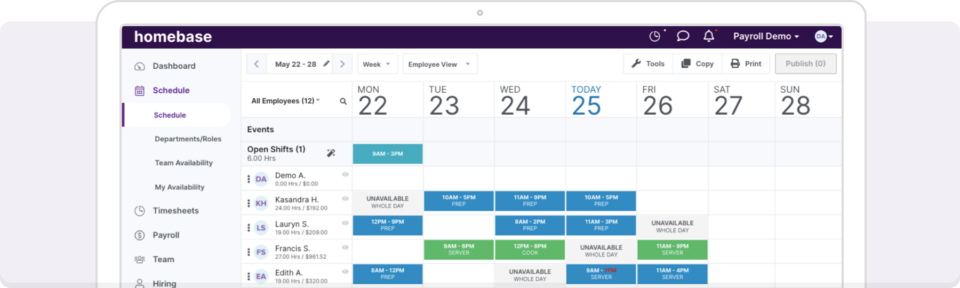
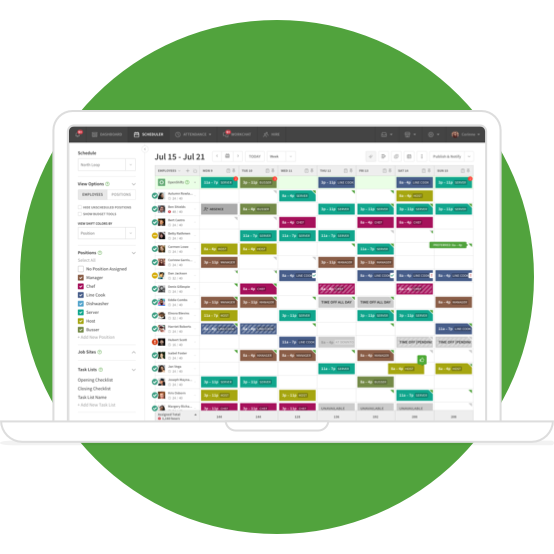
Homebase is designed for small, single-location businesses that prioritize a broad range of team management tools over specialized scheduling automation. If you run a local café, retail boutique, or service business with a very stable team, it provides a convenient way to manage hiring, onboarding, and basic HR within one platform.
However, Homebase operates as a short-term planning tool. Managers must be aware of the significant data-retention and cost trade-offs:
- 90-day scheduling and data limit: Across all plans, Homebase only allows you to manage timesheets for up to 90 days. This creates a recurring administrative burden.
- The add-ons: Essential operational tools are not included in the base price. Adding Payroll costs an extra $39/month, plus $6 per employee, while Tip Management ($25/mo) and Task Management ($13/mo) are also separate monthly fees.
- Manual conflict verification: On the free and lower-tier plans, the system does not automatically prevent overlapping shifts or availability conflicts. The manager remains responsible for manually verifying the schedule against employee time-off requests.
When ZoomShift makes more sense
Source: ZoomShift
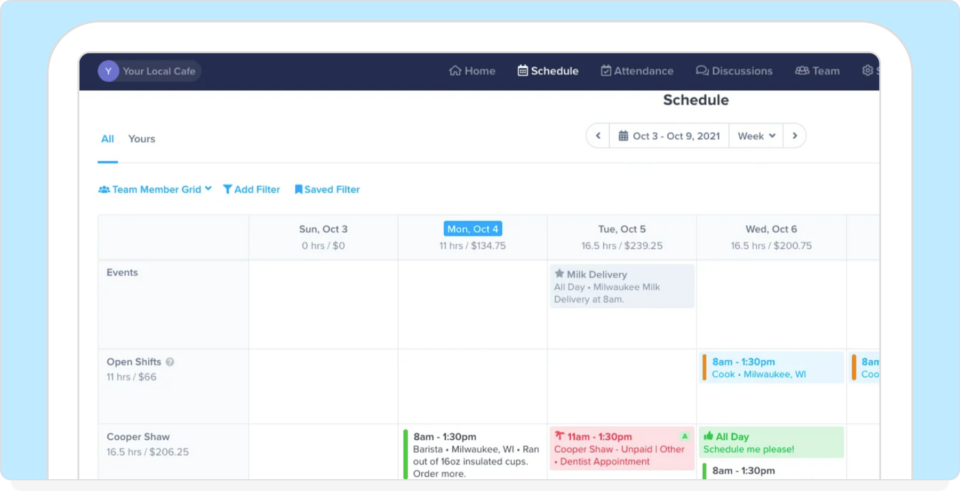
ZoomShift is primarily a digital shift-planning tool for small teams that want a straightforward way to publish a schedule. It serves as a functional digital whiteboard if your main priority is moving off paper and providing employees with a mobile view of their upcoming shifts.
While ZoomShift offers unlimited scheduling on its paid tiers, the ZoomShift pricing for the free version is designed for very limited horizons:
- Two-week scheduling limit: The free tier only allows you to schedule employees up to two weeks in advance. That makes it difficult for businesses that need to provide staff with a monthly or even a three-week outlook without upgrading to a paid plan.
- Paywalled labor controls: Critical cost-saving features, such as Overtime Warnings and Early Clock-In Prevention, are reserved for the Premium tier ($5/user/month).
- Manual template adjustments: ZoomShift relies heavily on templates. While this works for repeating weeks, any change in availability or seasonal demand requires the manager to manually adjust shifts, as the software lacks rule-based automation on lower tiers.
The real difference: Manual coordination vs automation
The biggest difference between these tools is the amount of work required from the manager during the scheduling process.
Homebase and ZoomShift: Manual entry
Both Homebase and ZoomShift use a drag-and-drop or template-based approach. While these tools make the schedule visible on a mobile app, they’re largely reactive. The manager is responsible for manually checking employee availability, spotting potential overtime, and ensuring that no two people are double-booked. If an error is made during entry, the software on lower tiers often allows the mistake to be published, leading to coverage gaps or payroll surprises later.
When I Work: Rule-based automation
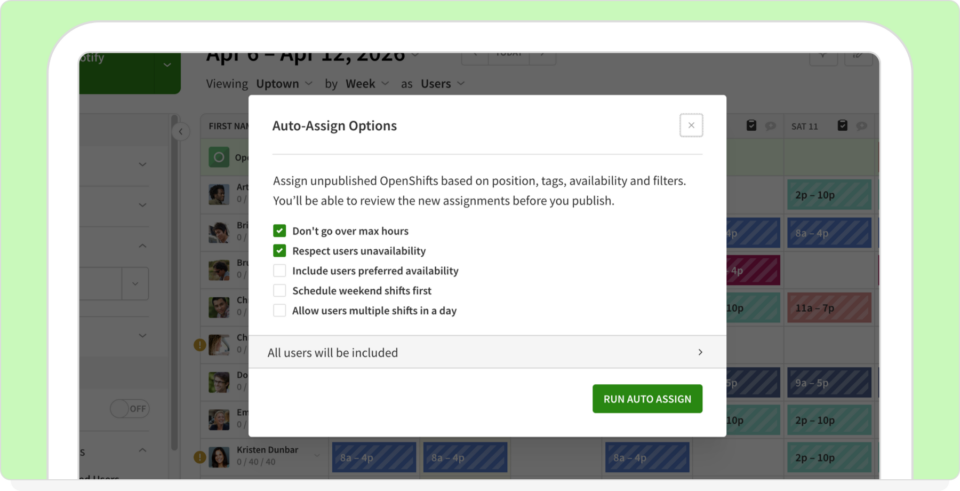
When I Work serves as the benchmark for automated scheduling. Instead of relying on the manager to spot every conflict, the system uses rule-based auto-scheduling. This means the software cross-references employee roles, availability, and labor-cost limits in real time.
If you attempt to schedule someone who has requested time off or who is approaching an overtime threshold, the system provides an immediate warning before the schedule is finalized. This shift from manual entry to automated verification significantly reduces the time spent on cleanup and manual adjustments each week.
Where manual scheduling systems fail
While both platforms work for simple shift planning, specific administrative challenges often arise when managers must manually oversee every detail. These issues typically stem from a lack of real-time data and automated conflict-checking.
Delayed labor cost visibility
In both Homebase and ZoomShift, labor costs are often treated as post-mortem metrics. Because the software does not always calculate the financial impact while the manager is building the schedule, overtime is frequently discovered during payroll processing. That makes it difficult to adjust coverage to stay within a set budget before the work actually happens.
Increased administrative back-and-forth
Without self-service tools for employees, shift swaps and time-off requests require constant manager intervention. When a system lacks the logic to suggest qualified, available replacements, the manager must manually verify every request against the master schedule and individual employee roles. That creates a continuous cycle of manual adjustments and fragmented communication.
Fragmented multi-location oversight
Visibility becomes an issue when employees work across different departments or locations. Without a unified view of an employee’s total hours across all sites, it’s easy to accidentally schedule a person for a double shift or push them into overtime. The fragmentation often leads to coverage gaps that may only be noticed at the start of a shift.
If you’re still building schedules manually, it’s worth seeing what that process looks like with automation in place.
Start Your When I Work Free Trial
Time tracking and accountability: Who is actually clocking in?
Most scheduling systems include a time clock, but they offer different levels of protection against payroll errors and attendance issues. For a business managing hourly staff, the main concern is ensuring that the person clocking in is actually on-site and authorized to start their shift.
Homebase: Standard GPS tracking
Homebase provides GPS-based time tracking that confirms the device’s location at the moment of clock-in. While this verifies that the employee is at the correct worksite, it does not include built-in identity verification as a feature. Managers must also be aware that some advanced attendance rules are tied to higher-cost tiers, which can lead to cost increases if early clock-ins aren’t manually monitored.
ZoomShift: Paywalled accountability tools
ZoomShift offers basic time tracking on its entry-level tiers, but the tools required to actually control labor costs are restricted. Essential features like Geofencing (ensuring employees are within a specific radius to clock in) and Early Clock-In Prevention are only available on the Premium tier. Without these tools, employees can clock in before their shift officially begins, creating incremental overtime costs that are difficult to catch until the end of the pay period.
When I Work: Accountability guardrails
When I Work serves as a benchmark for shift accountability by including labor-control tools in its core platform. In addition to GPS and geofencing, it offers optional photo verification at clock-in. That directly prevents buddy punching by requiring a photo of the person starting the shift.
Early clock-in prevention is also a standard feature. It allows managers to set a specific window (e.g., five minutes before a shift) during which an employee is permitted to clock in. By blocking unauthorized early starts, the system prevents time theft that often occurs when small, daily increments of unearned time accumulate across the workforce.
Pricing and operational impact
While the free entry-level tiers for Homebase and ZoomShift appear similar, the actual structures diverge based on the number of people you manage or the number of locations you operate.
Homebase: The flat-fee location model
Source: Homebase Pricing
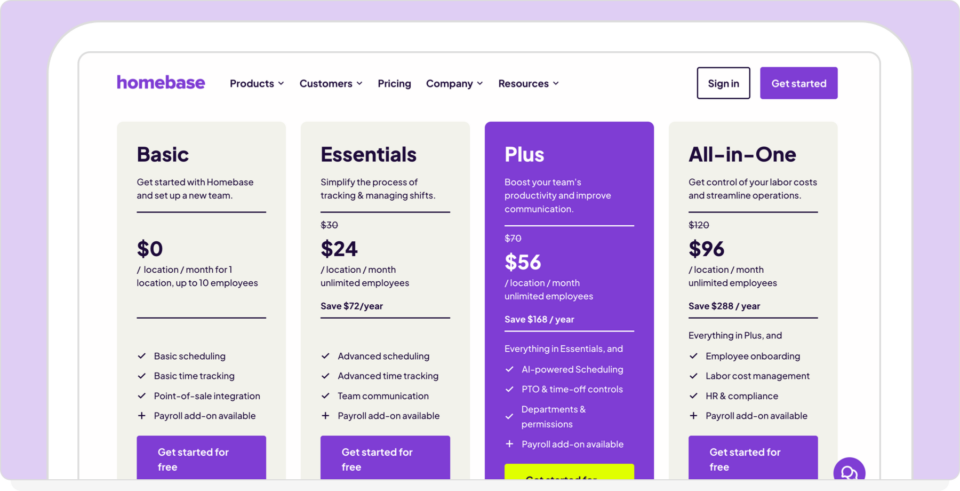
Homebase offers a free tier for one location with up to 10 employees. Their paid plans ($24–$96 per month) are charged per location, regardless of how many employees work there.
This model is cost-effective for single sites with a high headcount. However, it increases costs for businesses with multiple small sites. Adding a second location with only two employees requires a full additional location subscription. Essential operational tools like payroll ($39 and $6/user) and tip management ($25/mo) remain separate monthly add-ons.
ZoomShift: The feature-gated user model
Source: ZoomShift Pricing
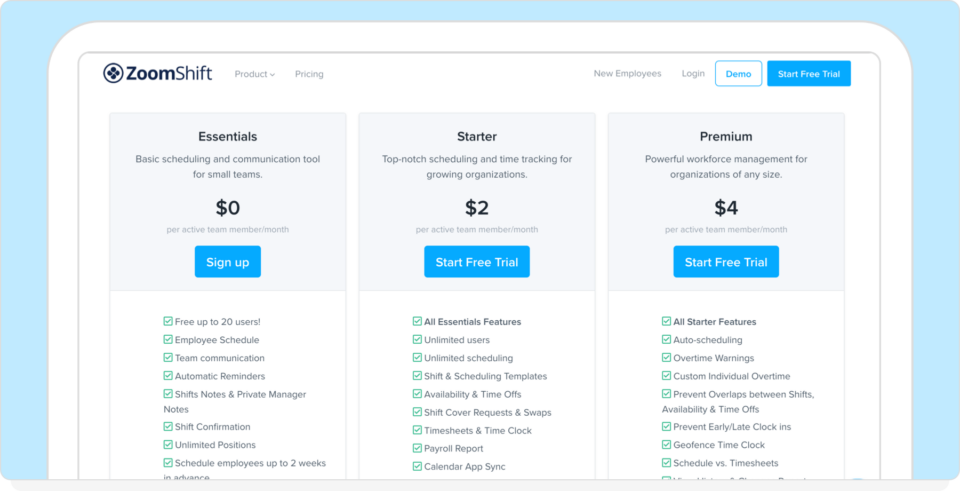
ZoomShift offers a free plan for up to 20 users. Beyond that, they charge per user, typically ranging from $2 to $5 per user per month.
While the per-user cost is low, many operational essentials are feature-gated. You may start on a lower tier for the price, but find you need to upgrade to the most expensive Premium tier to access early clock-in prevention or automated overtime warnings.
The Friday afternoon operational reality
The true cost of a system is measured in the time required to handle a last-minute schedule change. Consider a common scenario—it’s Friday afternoon, an employee calls out sick, and another is nearing an overtime limit. You’re currently using a free plan from ZoomShift or Homebase.
Manual coordination (Homebase and ZoomShift)
The manager must cross-reference messages to find an available replacement. The manager then manually calculates the overtime risk for that replacement before contacting the employee to confirm. The total labor cost impact is often verified only after the shift is completed and the payroll report is generated.
Automated coordination (When I Work)
The manager views a list of qualified, available replacements that the system has already vetted for overtime risk and role eligibility. The manager selects a replacement, and the system sends an automated push notification to the employee. The labor cost impact is updated in real time before the shift is assigned, preventing budget overruns before they occur.
Why When I Work matters
Most comparisons between Homebase vs ZoomShift focus on a checklist of entry-level features. While both tools successfully move a business away from paper schedules, they mainly function as digital versions of manual processes.
For managers responsible for maintaining complex coverage and controlling labor costs, the benchmark for employee scheduling software in 2026 is how much manual work it removes from the day. When I Work is included in this comparison to represent the standard for an automated workforce management system.
Some core capabilities define a professional scheduling benchmark:
- Rule-based auto-scheduling: Rather than manually assigning shifts and checking for overlaps, the system uses pre-set rules, such as employee availability, roles, and labor limits, to build and verify the schedule automatically.
- Pre-publishing labor visibility: Managers should be able to see the financial impact of a schedule, including projected overtime and labor-to-sales ratios, before any shifts are assigned to the team.
- Identity-verified accountability: Beyond standard GPS tracking, a benchmark system provides optional photo verification at clock-in to ensure payroll accuracy and prevent buddy punching.
- Centralized communication: Team messaging should be built directly into the scheduling app, ensuring that shift-related conversations are documented and visible to the right people without using external chat apps.
- Specialized integration: Rather than forcing a proprietary bundled payroll system, a benchmark platform integrates with industry-leading payroll providers like Gusto, ADP, and Rippling, allowing you to use the best tools for each part of your business.
Whether you’re choosing between Homebase and ZoomShift, evaluating them against these automated standards helps determine whether a tool simply displays your schedule or actively helps you manage it.
Final verdict: Selecting the right tool for your workflow
The decision between Homebase vs ZoomShift depends on whether you need a general HR administrative bundle or a straightforward digital schedule. However, if your goal is to reduce the actual time spent managing shifts and labor costs, the choice moves toward a more automated system.
Choose Homebase if:
Your main need is an all-in-one platform for hiring, onboarding, and basic HR functions, all in one place. It’s a practical choice for businesses with very stable teams where the schedule rarely changes, and you’re comfortable paying separate monthly add-on fees for payroll and tip management.
Choose ZoomShift if:
You need a free or low-cost digital alternative to a paper schedule for a small team. It’s a functional digital whiteboard for predictable environments where you don’t mind manually verifying conflicts, and you can work within a two-week scheduling horizon on the free plan.
Choose When I Work if:
You want to automate the scheduling process to prevent overtime and double-booking before they happen. It’s the benchmark choice for managers who need real-time labor cost visibility, GPS-verified accountability with photo clock-ins, and the flexibility to integrate with their preferred payroll provider.
Ultimately, the choice depends on the level of manual oversight you’re willing to maintain. For many managers, the transition to When I Work happens when the cost of manual errors and the time spent on administrative back-and-forth exceeds the cost of the software itself.
Save 8 hours a week by scheduling with When I Work
Sign up and schedule your employees for free.
ZoomShift vs Homebase frequently asked questions
Choosing between Homebase and ZoomShift requires understanding how each platform handles daily scheduling tasks and labor costs. Below are answers to common questions about pricing, feature limits, and why managers often transition to more automated systems.
Is Homebase better than ZoomShift?
The choice depends on your specific administrative needs. Homebase is a broad HR bundle designed for single-location businesses, whereas ZoomShift is a focused digital scheduling tool for small, stable teams. If your priority is reducing time spent on manual coordination and preventing overtime costs, a scheduling automation system like When I Work is the more efficient operational choice.
Does ZoomShift have a free plan?
Yes, ZoomShift offers a free plan for up to 20 users. However, this tier is limited to a two-week scheduling horizon, and cost-saving features like automated overtime alerts and early clock-in prevention require a paid Starter or Premium subscription.
How much does Homebase cost?
Homebase provides a free plan for one location with up to 10 employees. Their paid plans are billed per location, and essential operational tools, including Payroll ($39 plus $6/user), Tip Management ($25/mo), and Task Management ($13/mo), are separate monthly add-ons.
What is the best alternative to Homebase or ZoomShift?
When I Work is the standard alternative for teams that want to move beyond manual drag-and-drop scheduling. It provides rule-based auto-scheduling, labor cost visibility, and identity-verified time tracking in one platform, reducing the administrative work required to manage a shift-based team.
Why do teams switch from ZoomShift or Homebase?
Managers typically switch when the manual effort of adjusting schedules and chasing shift changes becomes too time-consuming. Common triggers include the need for better overtime control, the requirement for more than 90 days of historical labor data, or a team messaging system that doesn’t rely on external apps.
Try a simpler way to manage scheduling
When scheduling requires constant manual intervention, it’s a sign that the system is not handling the administrative workload.
When I Work is built to build schedules faster, prevent accidental overtime, and keep your team aligned without the need for constant back-and-forth messaging.
Start your free 14-day trial and see how much time you can save each week.
Disclaimer: This comparison is based on publicly available information and product documentation at the time of writing (accessed March 2026). Features, pricing, and functionality may change over time. While we aim to present accurate and up-to-date information, we recommend reviewing each provider’s official website for the most current details.