Scheduling Strategy
Connecteam vs Homebase (2026): Which Workforce Platform Fits Your Team?

If you’re comparing Connecteam vs Homebase, you’re likely looking for a scheduling and time-tracking platform that can keep your team organized without creating extra administrative work.
Both tools offer employee scheduling, time tracking, and team messaging. On the surface, they appear similar, which is why many managers exploring a Connecteam alternative or reading Homebase reviews struggle to see the differences right away.
The distinction becomes clearer when you look at how each platform is structured. Connecteam is designed as a broad workforce management platform with multiple modules. Homebase focuses heavily on businesses with scheduling tied closely to location-based pricing.
Understanding those structural differences matters before choosing a system that managers will rely on every week.
For teams that want a scheduling system that stays focused on shifts and attendance rather than a wider HR toolkit, take a look at platforms like When I Work as well.
Connecteam vs Homebase: At-a-glance comparison (2026)
When comparing Connecteam vs Homebase, it helps to start with a quick structural overview. Both platforms support scheduling, time tracking, and team coordination, but they organize those tools differently.
The table below highlights the main differences in pricing structure, product focus, and scheduling approach.
| Category | Connecteam | Homebase | When I Work |
| Ideal for | Teams that want a broader workforce platform with multiple modules | Single-location teams that want scheduling tied to the location | Shift based teams that want scheduling, time tracking, and messaging in one focused workflow |
| Structure | Separate Hubs (Operations, Communications, HR & Skills) | Scheduling is priced per location | Scheduling and time tracking platform with built-in messaging and payroll alignment |
| Free plan | Yes (up to 10 users) | Free for one location with up to 10 employees, with limited features | 14-day full-access free trial |
| Base pricing | Starts at $29 per Hub for up to 30 users, with additional user fees | Paid plans are priced per location, and payroll is an add-on | $2.50 per user per month for a single location or schedule plan; $5 per user per month for multiple locations or schedules |
| Scheduling | Drag-and-drop scheduling, templates, recurring shifts, and auto-scheduling tools (within Operations Hub tier) | Drag-and-drop scheduling, templates, availability, swaps and drops | Drag-and-drop scheduling, templates, recurring shifts, rule-based auto-scheduling |
| Time tracking | GPS, geofencing, kiosk mode, break, and overtime tracking | Time tracking and timesheets (plan dependent) | GPS, geofencing, photo clock-in, break, and overtime tracking |
| Payroll | Payroll integrations via supported partners | Built-in payroll available as an add-on | Direct integration with Rippling and payroll syncs for other providers |
| Team messaging | Chat and update tools in the Communications Hub | Messaging limited on lower tiers | WorkChat included in every plan |
What this table tells you
On the surface, Connecteam and Homebase overlap heavily:
- Time tracking
- Employee scheduling
- Team messaging
- Payroll workflows
The difference becomes clearer when you look at how those features are packaged.
- Connecteam offers a free entry plan, but if you have more than 10 employees, core communication tools sit in a separate Communications Hub that requires an additional subscription
- Homebase includes a free plan for one location, but team messaging is limited until you move on to a paid tier
- When I Work includes scheduling, time tracking, and team messaging together within the same core platform
In practice, this means that managers evaluating entry tiers often discover that certain coordination tools, especially team communication, require moving to higher plans on some platforms.
Where pricing comparisons can be misleading
Many businesses start by comparing workforce software based on feature lists and headline pricing. But the practical differences usually become apparent once teams begin using the platform day to day. Common challenges include:
- Pricing structures that change depending on users, locations, or modules
- Payroll tools that require add-ons
- Communication features that sit behind separate plans
- Administrative complexity when features are split across different areas of the platform
This is why it’s worth looking closely at how Connecteam pricing and Homebase pricing are structured. Headline prices such as “$29 per month” or a free plan for small teams can be attractive, but managers often discover the real differences when they start building schedules, approving timecards, and coordinating their team.
Connecteam pricing vs Homebase pricing
If you’re comparing Connecteam pricing vs Homebase pricing, the numbers can look straightforward at first glance. But workforce software rarely costs exactly what the homepage suggests.
The differences usually appear once teams begin using the platform more regularly. For example, when you:
- Add more employees to the system
- Manage schedules across multiple locations
- Turn on payroll features
- Enable more advanced scheduling tools
Understanding how each platform handles these situations can make it easier to see how the pricing actually works out.
Connecteam pricing (2026 Overview)
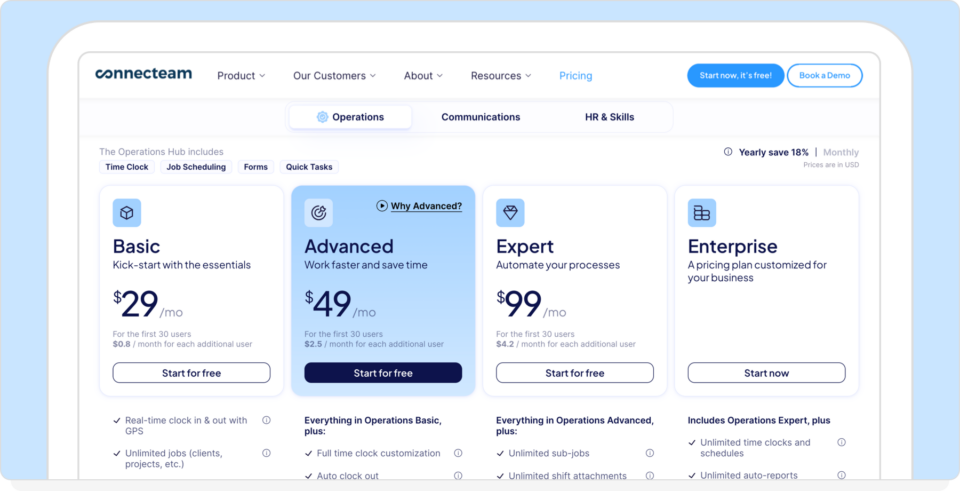
Image source: Connecteam Pricing
Connecteam uses a per-user, per-hub model, so you pay for individual hubs:
- Operations
- Communications
- HR & Skills
Each hub has tiered pricing. For example (Operations Hub):
- Basic: $29/month for up to 30 users
- Additional users: incremental per-user fee
- Higher tiers: unlock geofencing, auto-scheduling, and API access
So, if you want scheduling, messaging, and HR tools, you may need multiple hubs.
That multiplies the cost based on feature depth. However, Connecteam does offer:
- A free plan for up to 10 users
- 14-day free trial on paid plans
For very small teams, the free plan can be a useful entry point. For larger teams using multiple hubs, the overall cost depends on the total number of users and the number of hubs activated.
Homebase pricing (2026 Overview)
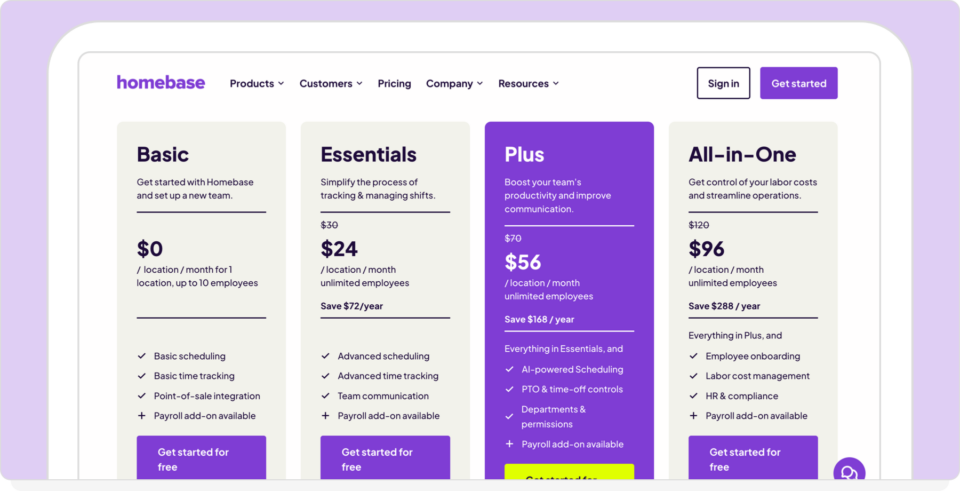
Image source: Source: Homebase Pricing
Homebase uses a per-location pricing model, meaning plans are priced per physical business location. A simplified version of the structure looks like this:
- Basic: free for one location and up to 10 employees (limited features)
- Essentials: $24 per location/month, unlimited employees
- Plus: $56 per location/month
- All-in-One: $96 per location/month
- Payroll: additional monthly fee plus per-employee payroll cost, with costs of $39/month plus $6/month for every employee that gets paid
In practice, this means:
- If you add more employees at the same location, your subscription does not usually change much once you are on a paid tier
- If you add another location, you add another subscription
- For a single-location business, the pricing can stay predictable
For a small team operating from a single location, the free plan can be a practical step up from manual scheduling or spreadsheets. However, once a business manages larger teams or multiple locations, the pricing increases in larger steps because each location requires its own subscription. Payroll features are also priced separately, no matter which plan you’re paying for.
Pricing scenarios: How costs typically change
It’s useful to look at the common situations that change what you pay when comparing Connecteam and Homebase.
One location, one team
Connecteam
For small teams (up to 10), the free tier offers all features and hubs, which is great value. For larger teams, if you only need scheduling and time tracking, you can often start with the Operations Hub. If you also want built-in team chat and announcements, that typically means adding the Communications Hub as a separate subscription.
Homebase
The free plan can serve as a basic replacement for spreadsheets for a small team at a single location. Once you move onto paid scheduling tiers or add payroll, costs increase.
In this situation, both platforms can be a workable entry point, depending on whether you need messaging included or can live without it.
Multiple locations under one brand
How each app handles multiple locations.
Connecteam
Connecteam pricing is mainly driven by user count and which hubs you subscribe to. Adding locations does not automatically add separate subscriptions, but using more modules can increase the total cost.
Homebase
Homebase pricing is tied to locations, so each additional site typically requires another plan. If you add payroll, that cost is added on.
This is where the pricing model feels very different in practice. One platform expands by feature modules, the other expands by location count.
Larger teams with more day-to-day admin
At this point, the question is usually less “what does it cost?” and more “how much admin work does it create?”
Connecteam
Connecteam can cover a lot, but the more hubs you turn on, the more settings and permissions managers need to maintain across the platform.
Homebase
Homebase can stay straightforward for single-site operations, but managing scheduling and payroll across multiple locations can require more paid tiers and add-ons.
Where When I Work fits in
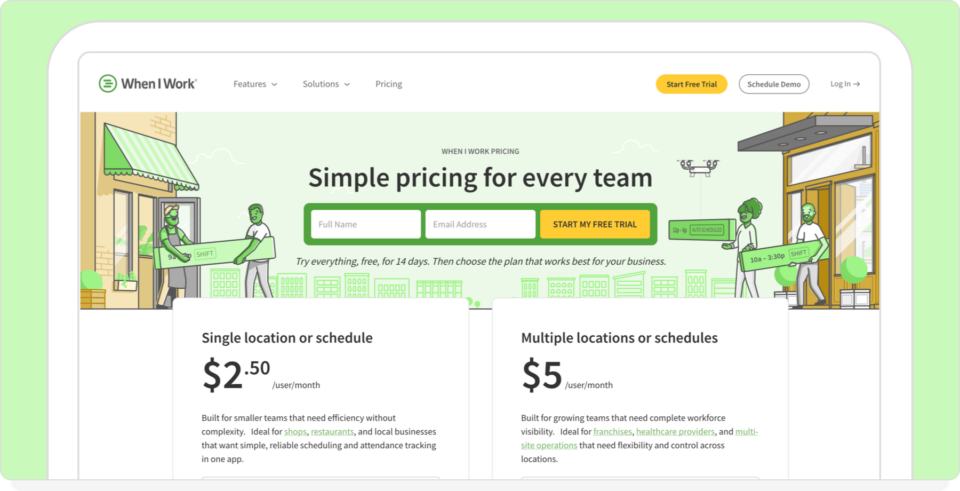
When I Work uses straightforward per-user pricing, with one plan for single-location teams and another for businesses managing multiple locations or schedules. Scheduling, time tracking, team messaging, and all other features are included together in the core platform, so managers don’t need to activate separate modules just to cover basic coordination.
The core pricing difference
Here’s the practical breakdown:
- Connecteam: Per-user pricing, but core tools like messaging sit in separate hubs that require additional subscriptions
- Homebase: Per-location pricing, with payroll and several basic tools available only on paid tiers
- When I Work: Per-user pricing with scheduling, time tracking, messaging, and payroll integrations in one platform
Each model suits a slightly different operational setup:
- Very small teams at one location: The Homebase and Connecteam free plans can be a simple upgrade from manual scheduling, though some features mean moving to paid tiers
- Teams that want an all-in-one workforce platform: Connecteam can cover scheduling, forms, communication, and training, but those features are organized across multiple hubs that require multiple subscriptions
- Teams focused primarily on scheduling and shift coordination: Platforms like When I Work that are designed around scheduling keep the obvious coordination tools in one place, instead of requiring separate modules for communication or workforce management features
Scheduling depth: Where workforce software actually proves itself
Most workforce management platforms list employee scheduling as one feature among many. But in practice, scheduling is the operational heartbeat of a shift-based business. If schedules are inaccurate, slow to build, or difficult to adjust:
- Payroll errors increase
- Overtime spikes
- Managers lose hours every week fixing shifts
- Staff morale drops
- Compliance risk rises
That’s why comparing Connecteam vs Homebase on scheduling depth matters more than simply comparing feature lists.
Connecteam scheduling
Connecteam includes a capable employee scheduling tool within its Operations Hub. Key features include:
- Drag-and-drop shift building
- Recurring shifts
- Templates
- Open shift claiming
- Auto-scheduling (available on higher tiers)
- Task attachments within shifts
- Geofence-aware time tracking
For distributed or field-based teams, this combination can be useful, particularly when paired with Connecteam’s GPS tracking and forms.
However, scheduling sits inside a broader, modular platform. When businesses enable multiple hubs, scheduling becomes one part of a larger interface that may also include training tools, compliance tracking, surveys, and internal communication.
For some teams, that broader toolkit is valuable. For others, it’s extra admin time when managers want to just build and change schedules quickly.
Homebase scheduling
Homebase includes a robust scheduling tool that helps managers build and adjust schedules quickly. Key capabilities include:
- Drag-and-drop scheduling
- Scheduling templates and auto-scheduling tools
- Labor cost visibility while building shifts
- Sales forecast feature for labor planning
- Shift swaps and availability tracking
- Built-in time-off visibility
Managers can build schedules manually or use templates and auto-scheduling tools that consider employee availability, time-off requests, and labor targets. The system can also highlight projected labor costs while schedules are being created.
However, these automation features are not available on the free plan. Teams using Homebase’s free tier are limited to manual schedule building, with auto-scheduling and other advanced scheduling tools unlocked in paid plans.
When I Work scheduling
When I Work is designed around the daily realities of building and maintaining staff schedules. Scheduling sits at the center of the platform and uses built-in:
- Messaging
- Time tracking
- Labor forecasting
- Shift notifications
- Attendance workflows
Key scheduling capabilities include:
- Rule-based auto-scheduling
- Certification-aware shift assignment
- Availability enforcement
- Overtime controls
- One-click shift fills
Managers can build a schedule, notify employees, track attendance, and fill open shifts from the same place. If someone calls out, managers can post the shift, notify eligible employees, and confirm coverage without switching between separate tools or modules.
The practical advantage is fewer steps when schedules change. Instead of wasting time rebuilding shifts or chasing messages across multiple systems, teams can adjust schedules and fix coverage gaps directly inside the scheduling workflow.
The structural difference
The deeper distinction between these platforms is how scheduling fits into the overall system.
- Connecteam: A platform where scheduling sits alongside communication, forms, training, and HR tools
- Homebase: Built around location-based team management, where scheduling is closely tied to labor planning and shift coverage for each site
- When I Work: Designed around scheduling and time tracking, with messaging and labor visibility built in
These design choices affect how managers interact with the system day to day. Differences show up in practical moments, such as:
- How quickly managers can fill a last-minute call-out
- How easily schedules can be adjusted during the week
- How overtime warnings appear while planning shifts
- How schedules are managed across different locations
None of these differences is dramatic on day one. But over time, the way scheduling is built into the system can shape how much time managers spend maintaining schedules each week.
Multi-location scheduling: How each platform handles it

Managing schedules across multiple locations introduces a different set of challenges. Managers need to coordinate staff across sites, fill shifts quickly, and keep labor visibility clear without duplicating work.
This is where the design of each platform becomes more noticeable.
Homebase: Location-based scheduling
Homebase structures teams around individual locations. Each location has its own schedule, employee list, and management view. Managers typically:
- Build schedules for each location separately
- Manage employees assigned to that site
- Handle shift coverage within that location
This structure can work well for businesses where each location operates relatively independently.
However, because Homebase pricing is tied to locations, additional locations require additional subscriptions once you move beyond the free single-location plan. The free plan is limited to one location and up to 10 employees, with more advanced scheduling tools unlocked on paid tiers.
Each new location increases the base subscription cost even before payroll is layered in.
Connecteam: Users across teams and sites
Connecteam organizes teams by users rather than locations. Employees can be grouped by job site, department, or project, depending on how the organization configures the system.
Managers can:
- Assign shifts to employees across different teams or locations
- Manage schedules within the same platform environment
- Use tags or groups to organize staff by site
Because Connecteam pricing is based on hubs and users (with costs per user increasing after the first 30 employees) rather than locations, adding another site does not automatically create a new subscription. However, scheduling still sits within the broader platform structure alongside forms, training, and communication tools.
When I Work: Multi-location scheduling plans
When I Work supports both single-location and multi-location scheduling through different plan tiers. Managers can:
- Build schedules across multiple locations
- Assign employees to more than one location or schedule
- Coordinate coverage across teams when shifts open up
The single-location or schedule plan supports teams operating from one site or schedule. The multiple locations or schedules plan unlocks scheduling across multiple sites within the same system.
Because scheduling, time tracking, and messaging sit together in the same workflow, managers can adjust shifts, notify staff, and confirm coverage without moving between separate modules.
What this means in practice
Each platform handles multi-location coordination differently:
- Homebase organizes teams by location, with separate subscriptions tied to each site
- Connecteam organizes teams primarily around users and groups
- When I Work allows schedules to be managed across locations within the same scheduling workflow
For managers coordinating staff across several locations, the practical question is how easily schedules can be built, adjusted, and communicated across sites without having to rebuild the same schedule multiple times.
Final verdict: Making the right call for your team
Connecteam, Homebase, and When I Work all support scheduling, time tracking, and team coordination. The difference lies in how each platform approaches workforce management and how much of the system revolves around scheduling itself.
Here’s the practical guidance.
Connecteam
Connecteam fits teams looking for a broader workforce management platform that combines scheduling with additional operational tools. The platform includes features such as:
- Team communication
- Forms and checklists
- Training modules
- Compliance workflows
- GPS-based time tracking
Its modular hub structure allows companies to enable different feature areas as needed. For small teams, the free plan for up to 10 users can be a useful starting point.
Homebase
Homebase works well for businesses operating from a single physical location or a small number of locations. The platform combines:
- Employee scheduling
- Time tracking
- Team messaging (only on paid plans)
- Labor planning tools
Its free plan can be a good entry point for teams with one location and up to 10 employees, though features such as advanced scheduling are unlocked in paid tiers. Because pricing is tied to locations, each additional location requires its own subscription.
When I Work
When I Work focuses directly on scheduling and attendance management. The platform centers daily operations around:
- Building and publishing schedules
- Filling open shifts quickly
- Tracking attendance and labor hours
- Communicating schedule changes with the team
Scheduling, time tracking, and messaging are all built in, allowing managers to adjust shifts and notify employees with ease.
For teams that rely on accurate schedules every week, the focus can reduce the time spent coordinating coverage and resolving schedule conflicts.
Direct recommendation
Connecteam and Homebase both serve their audiences well. Connecteam offers a broad workforce platform, while Homebase provides a straightforward scheduling solution for location-based teams.
When I Work is designed specifically for teams that treat scheduling as a core operational task rather than just another HR feature.
If your priority is publishing schedules quickly, filling shifts when plans change, and keeping scheduling communication in one place, start by testing the platform built around those workflows.
You can run a practical test right now. Start a 14-day free trial of When I Work and run your next schedule through it. See how quickly you can:
- Publish a full schedule
- Fill a last-minute call-out
- Notify your team about schedule changes
Start Your Free 14-Day Trial Of When I Work Today
Disclaimer: This comparison is based on publicly available information and product documentation at the time of writing. Features, pricing, and functionality may change over time. While we aim to present accurate and up-to-date information, we recommend reviewing each provider’s official website for the most current details.